

tvOS Streaming Excellence 2026
Easy Setup Guide: How to Watch EuroLiveTV IPTV on Apple TV
Setting up Apple TV IPTV is the ultimate way to enjoy premium global content on Apple’s high-performance hardware. In 2026, the Apple TV 4K remains the fastest and most stable streaming device on the market, offering a level of smoothness that other boxes simply cannot match. This guide will walk you through the essential steps to configure your Apple TV IPTV connection using EuroLiveTV, ensuring you get a cinematic experience in your living room.
Why Apple TV is the Best Choice for IPTV
The primary reason to choose Apple TV IPTV over other platforms is the processing power. The A-series chips inside the Apple TV allow for instantaneous channel switching and superior upscaling of older content. When you use EuroLiveTV on this device, the interface feels fluid, and the 4K VOD library loads with incredible speed. Additionally, the Apple ecosystem ensures that your Apple TV IPTV apps are regularly updated for security and performance, providing a "set it and forget it" solution for home entertainment.
Another advantage is the integration with Apple’s ecosystem. You can use your iPhone as a remote or keyboard to enter your login credentials, making the initial Apple TV IPTV configuration much faster than typing with a standard remote control. With tvOS 19, the multitasking and video decoding capabilities have improved further, making this the gold standard for high-bitrate streaming.
Top IPTV Apps for Apple TV in 2026
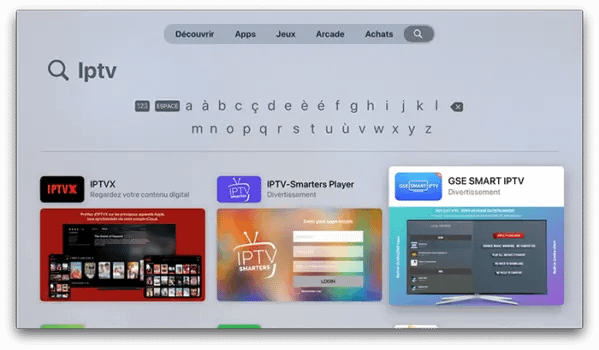
To start your Apple TV IPTV journey, you need a high-quality player from the App Store. Unlike Android, Apple TV uses third-party "shells" to play your EuroLiveTV content. We recommend the following:
- iPlayTV: Often cited as the best app for Apple TV IPTV, it offers a beautiful EPG grid and excellent category management.
- GSE Smart IPTV: A powerful, highly customizable option that supports multiple playlist formats and advanced video settings.
- IPTV Smarters: A reliable, user-friendly choice that many EuroLiveTV customers prefer for its simple Xtream Codes login.
Step-by-Step Configuration Guide
Follow these steps to complete your Apple TV IPTV setup successfully:
- Install an App: Download your preferred IPTV player from the tvOS App Store.
- Add Playlist: Choose "Add via Xtream Codes API" (highly recommended for stability).
- Enter Credentials: Input the server URL, Username, and Password provided by EuroLiveTV.
- Download Data: Allow the app a few moments to fetch the 20,000+ channels and VOD posters.
- Start Watching: Navigate to Live TV or Movies and enjoy 4K quality!
Optimizing Your 4K Streaming Quality
To get the most out of your Apple TV IPTV connection, we recommend using a wired Gigabit Ethernet connection. While the Wi-Fi 6E in newer Apple TV models is fast, a physical cable provides the consistent low latency required for live sports. Additionally, ensure your Apple TV settings are set to "Match Content and Frame Rate." This allows your Apple TV IPTV app to automatically adjust your TV's refresh rate to match the broadcast (e.g., 50Hz for European football or 24fps for Hollywood movies), eliminating judder.
The Ultimate Apple TV Experience
Upgrade your Apple TV IPTV today with our high-bitrate premium servers.
ACTIVATE NOWTroubleshooting Common Issues
If you experience buffering during your Apple TV IPTV session, the first step is to check your internet speed. We recommend a minimum of 50 Mbps for buffer-free 4K. If the speed is fine, try clearing the cache within your IPTV app. On Apple TV, you can also force-close the app by double-clicking the TV button on your remote and swiping up. This often fixes minor handshake issues with the Apple TV IPTV server.
Lastly, ensure that your VPN is configured either on your router or via a dedicated tvOS VPN app. Using a VPN with your Apple TV IPTV setup is essential to prevent ISP throttling and to ensure your streaming traffic remains private and secure from prying eyes.
In conclusion, the combination of EuroLiveTV and Apple TV IPTV offers the most premium home cinema experience available in 2026. By choosing the right app and following our optimization tips, you can enjoy limitless entertainment with the reliability of Apple hardware. Start your setup today and see why millions are making the switch to Apple TV IPTV.